


Familo: Find My Phone Locator
4.31.75K Reviews
App Specs
- Version
- 2.113.3
- Updated On
- License
- Free
- Downloads
- 10,000,000+
- Developer
- SAFETIX LTD
- Categories
- Lifestyle
- Platform
- Android, iOS
Screenshots
 Analysis by AppCompare
Before deciding whether a shared location app belongs on everyone’s phone, I’d first ask what the family actually needs it to solve. Is the goal a quick way to coordinate pickups, reassurance during a late journey, or help finding a misplaced device? Familo: Find My Phone Locator is aimed at those everyday situations, but it works best when everyone understands why it is being used and agrees on how location sharing fits into family life.
What you can expect to pay
Familo is a free lifestyle app from SAFETIX LTD, and its current version is 2.109.9. It also offers in-app purchases priced from $2.99 to $89.99 per item. That range is worth noticing, but it does not tell me which particular options cost what or what each purchase includes, so I would check the purchase details inside the app before paying. The sensible starting point is to try the free access and judge its usefulness in your own routine rather than assuming a paid item is necessary.
For an app used by a whole household, “free” is only part of the value equation. People need to be comfortable installing it, sharing locations, and keeping their phones usable throughout the day. I would treat any optional purchase as worthwhile only if it solves a specific problem the family has encountered, not simply because the app presents an upgrade. The cost can be judged accurately only alongside the feature details shown at the point of purchase.
Where the practical value comes from
The strongest case for Familo is reducing small coordination hassles. If a teenager is walking home, a parent can check the shared location rather than sending repeated “where are you?” messages. If relatives are meeting at a busy place, a shared map can make the final handoff easier. These are modest benefits, but they can make a difference when the same situations come up every week.
It can also give a family one shared place for location-based check-ins instead of relying on a mix of texts and separate map tools. That convenience is most useful when several people need to see the same information. If only one person wants to locate their own lost phone, a device maker’s built-in finding service may be a more direct choice; Familo’s appeal is the family coordination angle.
The tradeoffs are part of the experience
Location sharing is only reassuring when the information is current enough to act on. A phone that is out of battery, has no connection, or is not being carried cannot provide a dependable picture of its owner’s whereabouts. I would use Familo as a helpful check-in tool, not as proof that someone is safe or as a replacement for calling them when a situation genuinely needs attention.
There is also a social tradeoff: constant visibility can feel supportive to one family member and intrusive to another. Agreeing in advance about who can see whom, and when it is reasonable to check, matters as much as the app itself. For younger users, I’d explain the purpose openly rather than presenting tracking as a secret safety measure. For adults, consent should be just as clear.
Worth Reading Before You Choose

Flipboard Shows What News Apps Must Do Beyond the Feed

Switching to Android Auto Means Rethinking Your Driving Routine

Google Calendar Makes a Crowded Week Easier to Manage

Ludo King Makes the Most of the Minutes Between Plans

Baby Panda World Brings Quick Play to Modern Phones, but Its Game Library Feels Busy

ESPN’s Live Game View Makes Following Close Games Easier
People who want strict privacy, do not want their movements shared, or would rather keep location information within the phone’s built-in tools may prefer an alternative. A standard messaging app can be enough for occasional meetups, while a manufacturer’s locator is often better for finding one device. Familo makes more sense when a group wants a continuing shared routine and is comfortable with that arrangement.
Who is likely to get the most from it
I can see it fitting families with children who travel independently, relatives coordinating care, or households that regularly split up for errands and need an easy way to reconnect. It is less compelling for people who rarely coordinate locations, already have a shared tool everyone likes, or do not want a location app running as part of daily life. The best test is whether the group has a recurring problem that location sharing actually resolves.
Familo is rated Teen, so I would not treat it as a substitute for an adult’s judgement about whether a child is ready to carry a phone or travel alone. An app can help a caregiver coordinate, but it cannot make a route safe, guarantee a response, or replace a conversation about what to do if plans change. That distinction keeps the tool useful without asking it to promise more than a phone can deliver.
A routine that makes the app more useful
Imagine a weekday pickup where a parent is running late and a child is waiting after an activity. Instead of calling several times, the parent can check the location, then send a short message if a detail needs confirming. The child can see the same shared context, so the exchange is about the next step rather than trying to establish where everyone is. This works best when the family has agreed beforehand that a location check is for coordination, not for monitoring every stop.
A practical tip is to set expectations before relying on the app: decide who joins the family group, what location sharing means, and what to do if the map does not update. It is also worth making sure each person knows how to contact the group without depending on the location view. That simple backup plan prevents a phone issue from turning into a false alarm.
Getting Started with Familo
Setting up Familo: Find My Phone Locator is straightforward. The app is available for both Android and iOS, so you can find it easily in the Google Play Store or the Apple App Store. Once downloaded, you'll go through a simple registration process where you add your family members and set permissions. It’s all pretty intuitive, and you don’t need to be tech-savvy to get it running.
Features That Stand Out
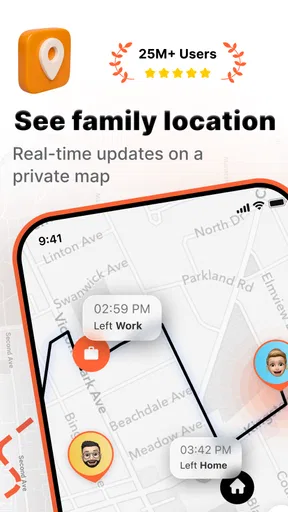
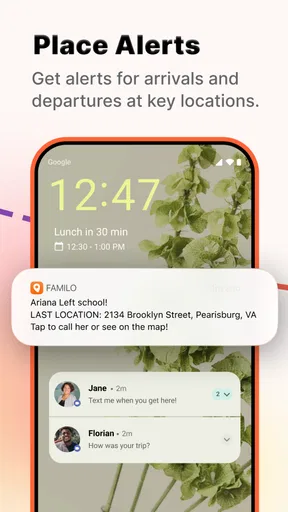
One of the first things I noticed about Familo is its real-time location tracking. The app provides you with up-to-date locations of your family members, which can be a lifesaver when coordinating meetups or checking in on someone late at night. The accuracy is impressive, and you can even set up geofenced areas to get alerts when someone enters or leaves a designated zone.
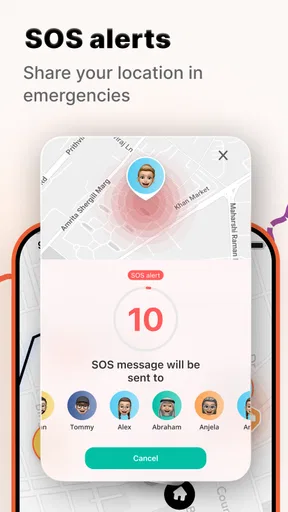
Another handy feature is the panic button. In emergencies, any family member can press this button to send an immediate alert to everyone in the group. It's a reassuring feature, especially for parents with kids or those with elderly family members.
Keeping It User-Friendly
Familo prides itself on its user-friendly interface. The design is clean and intuitive, allowing you to navigate through different functions without getting lost. Adding family members is as simple as sending an invite link. Plus, the app doesn’t bombard you with ads, which is a huge plus in my book.
Let’s not forget about privacy. Familo takes user privacy seriously, offering options to customize who can see your location and when. You’re in control, which makes the app feel less intrusive.
Staying Connected
Aside from tracking, Familo doubles as a communication tool, allowing you to chat with family members directly through the app. This feature is quite handy when you need to coordinate plans or send quick updates. The chat function is basic but does the job well.
The Little Extras
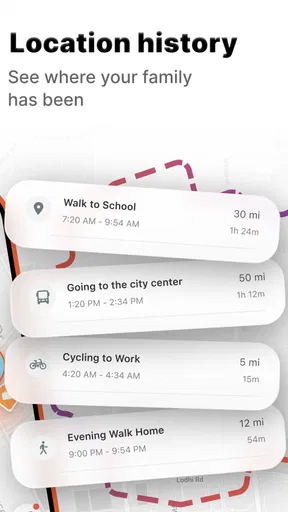
Familo also offers location history, which lets you view the places a family member has been. It’s a neat feature for parents wanting to ensure their kids are where they say they are, or for anyone interested in their travel patterns.
Additionally, the battery level indicator is a small but useful feature. You can see the battery status of each family member’s phone, which helps in ensuring they stay connected.
Final Thoughts
Overall, Familo: Find My Phone Locator is a solid choice for anyone looking to keep track of their loved ones and their devices. It’s packed with features that make it more than just a tracker, and the user-friendly design ensures that anyone can use it without much hassle. While it’s not groundbreaking in terms of innovation, it delivers on its promises effectively, making it a reliable companion for families and individuals alike.
If you’re interested in giving it a try, you can download it from your preferred app store and see how it fits into your daily routine. Whether you’re a parent, a caregiver, or someone who just misplaces their phone a lot, Familo might just be the app you didn’t know you needed.
Making an informed choice
Familo has a 4.3 average from around 434,000 ratings, with about 1,700 written reviews, and has passed 10 million installs. Those figures suggest that many people have tried it, but popularity alone cannot tell you whether its approach suits your household. I would focus on the day-to-day fit: does everyone who needs to participate have a compatible phone, understand the sharing arrangement, and actually want a shared location routine?
The app first appeared on September 18, 2013, and its minimum operating system requirement is Android 6.0. If you are setting it up for a relative with an older handset, checking compatibility before making a plan around the app is a useful first step. Familo is also available on iOS, so a household does not necessarily need to use the same mobile platform, but each person should install and configure it before an outing rather than during a stressful moment.
Small habits that prevent confusion
Location history can be useful for reviewing a journey, but I would agree on its purpose before turning it into a routine. For example, a caregiver might use it to confirm that a planned trip went as expected, while a family may decide not to inspect ordinary movements without a practical reason. This keeps a useful record from becoming a source of tension or a substitute for asking someone directly.
The battery indicator also has a narrow but practical role: it can help explain why someone may soon become unreachable. If a family member’s phone is low, the right response might be to arrange a call or a meeting point before the battery runs down. It is not a guarantee of availability, though, so I would avoid treating a displayed level as proof that the phone will remain connected.
When another approach is better
For a one-off rendezvous, sending a message with a meeting point may be simpler than asking everyone to join a location-sharing group. For a misplaced personal phone, the platform’s own find-my-device service is often the more focused tool. Familo stands out when the need is ongoing and mutual: several relatives want to coordinate, use alerts or chat, and have a shared view rather than repeatedly starting temporary exchanges.
I would also skip it if the family cannot agree on reasonable boundaries. The very features that make location checks convenient can create pressure if one person feels watched or expected to respond immediately. In that situation, a simple check-in message or scheduled call is a healthier choice. The app should support a relationship, not become the rulebook for it.
My buy-or-skip verdict
I would start with the free version if the household has a clear, recurring coordination need and everyone is comfortable sharing their location. Try it for ordinary use first: a pickup, a split errand, or a late trip home. That gives you a realistic sense of whether the shared map and communication tools reduce friction. Only consider an in-app purchase after checking exactly what it unlocks and deciding that the specific benefit is worth its listed price.
Familo is not essential for every family, and I would not pay for it on the assumption that any location app can guarantee safety. But for people who want a shared, consent-based way to coordinate everyday movement, it offers a practical starting point. If your need is occasional, privacy-sensitive, or limited to finding one lost device, choose a simpler alternative; if the group will genuinely use shared location as a convenience, Familo is worth trying without treating it as a substitute for communication or good judgement.
Pros
- Real-time location tracking for family safety.
- Easy setup with user-friendly interface.
- Battery-saving technology for longer use.
- Customizable alerts for specific locations.
- Cross-platform compatibility with Android and iOS.
Cons
- Limited free features without subscription.
- Occasional location inaccuracies reported.
- Requires constant internet connection.
- Privacy concerns with location sharing.
- Dependent on GPS signal for accuracy.
FAQs for Familo: Find My Phone Locator
What features does Familo: Find My Phone Locator offer?
Familo provides real-time location tracking, allowing you to see where your family members are at any given moment. It offers geofencing alerts, so you’re notified when someone enters or leaves a specified area. Additionally, it includes an SOS feature for emergencies and private messaging to keep communication secure among family members.
How accurate is the location tracking in Familo?
The app uses GPS technology to provide accurate location tracking. However, the accuracy can depend on factors such as the device's GPS capabilities, network connectivity, and environmental conditions like tall buildings or dense forests. Generally, Familo provides reliable tracking within a few meters of accuracy.
Is Familo: Find My Phone Locator safe to use?
Yes, Familo prioritizes user privacy and security. It ensures data encryption and allows only approved family members to view each other’s locations. The app complies with data protection regulations and doesn't share personal information with third parties, making it a secure choice for family location tracking.
Does Familo drain phone battery quickly?
Familo is designed to be battery-efficient while providing continuous location updates. However, like most GPS-based apps, it can consume more battery than usual. To minimize battery drain, the app uses smart algorithms to optimize location updates, especially when the app runs in the background.
Can I use Familo without an internet connection?
Familo requires an internet connection to function effectively, as it relies on GPS and mobile data or Wi-Fi to update location information. In areas with poor connectivity, the app might experience delays in updating locations, but once the connection is restored, it will update to show the latest information.


